Full-Stack Authentication and Authorization Solution
For SaaS development, authentication and authorization are often too tedious to build from scratch in development environments, yet essential for production. This article explains the most cost-effective solution in one go.
Core Concepts
Authentication
Determining the identity of a user.
Authorization
Determining whether to grant permissions based on the user’s identity.
OAuth2
An authorization protocol.
OIDC (OpenID Connect)
An authentication protocol built on top of OAuth 2.0, effectively OAuth 2.0 + an identity layer.
Role-Based Access Control (RBAC)
Granting permissions based on user roles (e.g., an admin can access /api/admin/*, while a user can access /api/xxx/*).
Pain Points of Traditional Solutions
e.g., Username/Password, hand-rolled JWT, session management…
- Difficult to integrate third-party logins.
- Requires writing large amounts of boilerplate code.
- Requires designing data tables and providing CRUD APIs.
- Insecure.
The Solution
Principle
In this solution, there are three roles: Frontend, Backend, and Authentication Server.
Workflow:
- User clicks login; the frontend redirects to the Authentication Server (
/login/authorize?...). - After logging in, the Authentication Server redirects back to the frontend (
/callback?code=…). - The frontend sends the Authorization Code to the backend (to exchange for an AccessToken).
- The backend uses the Authorization Code provided by the frontend and the Client Secret provided by the Authentication Server to exchange for an Access Token from the server.
- The backend returns the Access Token to the frontend. The backend can choose to set an HttpOnly Cookie (more secure) or let the frontend store it in
localStorage. - The frontend uses the AccessToken to access protected APIs. The backend verifies the AccessToken using a public key, retrieves user role information, and performs authorization using the RBAC model.
Advantages
The Authentication Server handles everything: username/password auth, third-party logins, user profile editing, 2FA, etc., eliminating boilerplate code. OAuth is an industry standard with guaranteed security. Furthermore, one Authentication Server can manage multiple applications, providing a once-and-for-all solution.
Note
My solution does not use any specific auth libraries; it is entirely based on HTTP and OIDC protocols, making migration to other languages very easy. The backend only needs to support middleware/interceptors. Even with Java + Spring Boot, the code totals less than 200 lines.
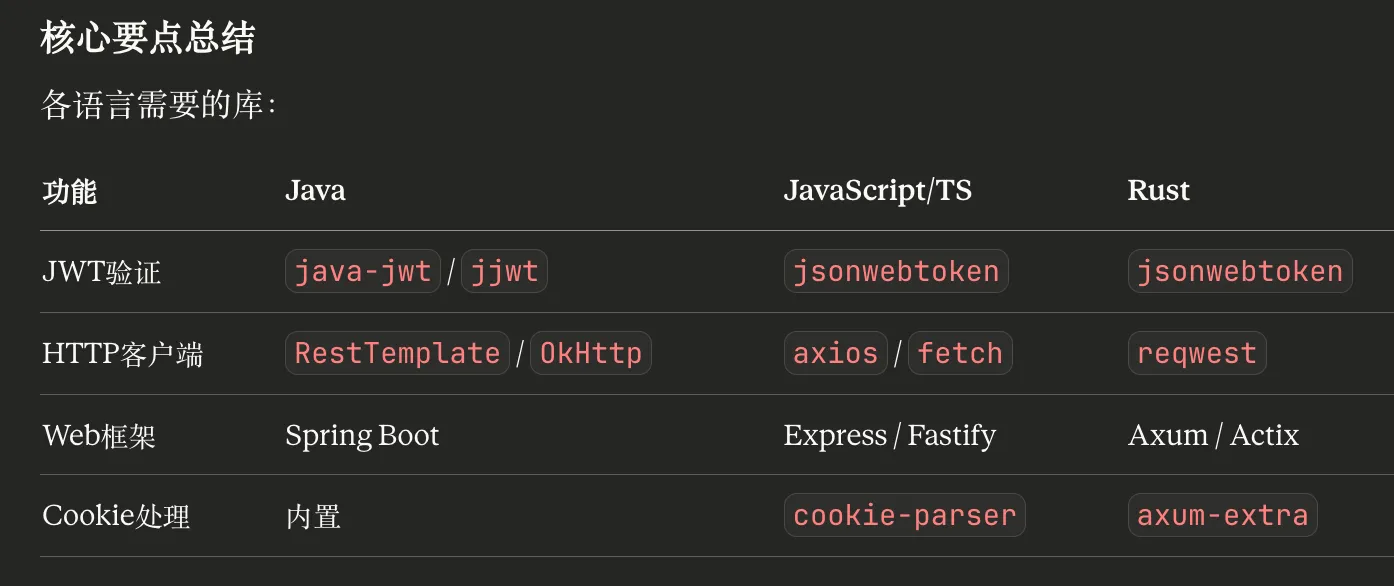
Finished Product Screenshots:
- Regular User (can edit own profile)
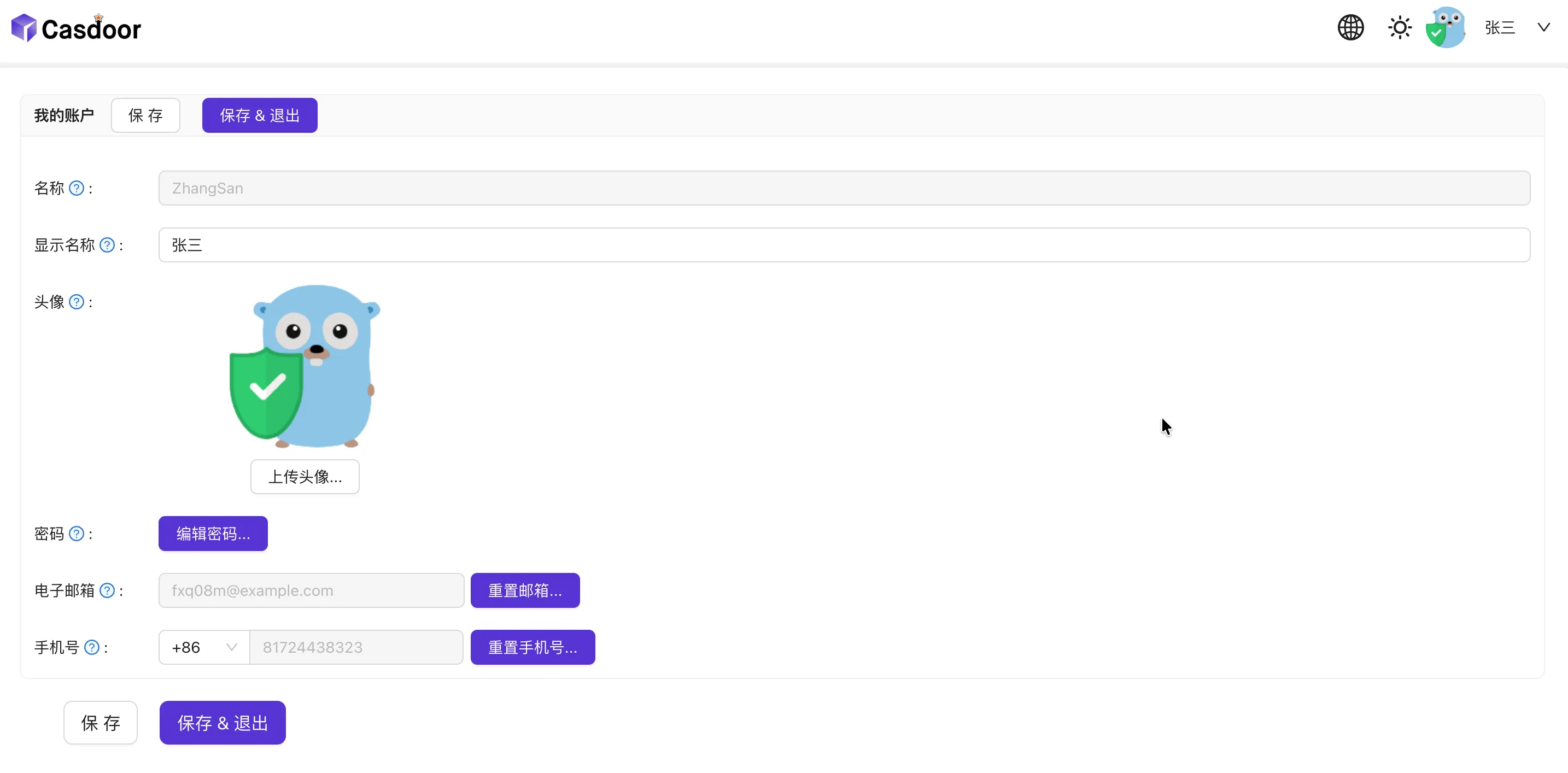
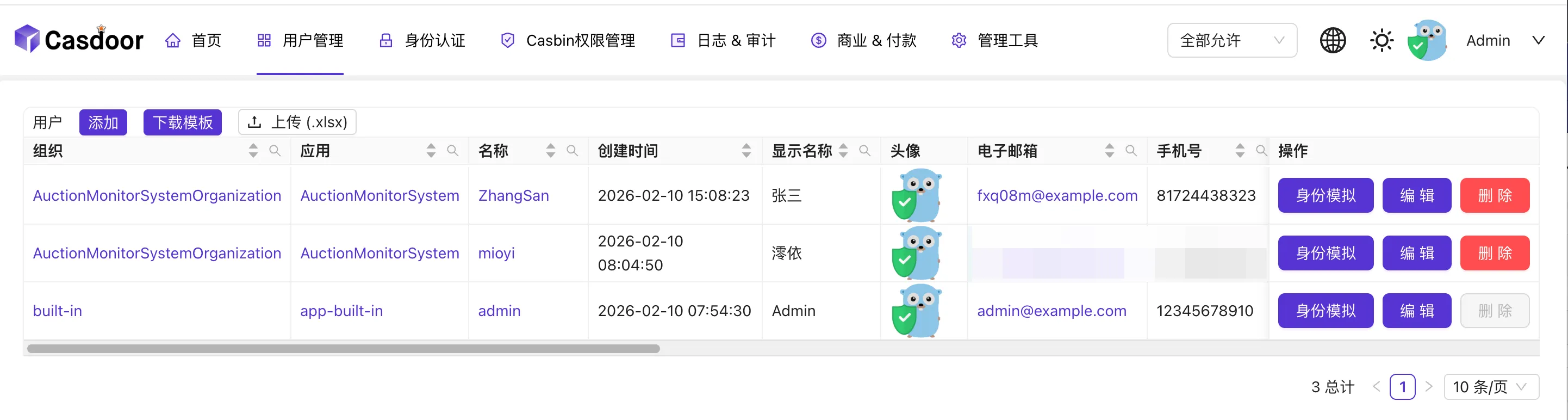
- Admin (can manage users, tokens, registration, and many other features)
- Permission Management

Implementation
Set Up the Authentication Server
Deploy the authentication service using Docker. Any server compliant with OAuth2 and OIDC standards works (e.g., Keycloak). Here we choose Casdoor for its superior ease of use. (https://casdoor.org/docs/)
docker-compose.yml1 2 3 4 5 6 7 8 9services: casdoor: image: casbin/casdoor:latest container_name: casdoor volumes: - ./conf:/conf network_mode: hostconf/app.conf(Mainly configuredriverName,dataSourceName, anddbName. Here we use PostgreSQL; for others, see https://casdoor.org/docs/basic/server-installation#configure-database)
1 2 3 4 5 6 7 8 9 10 11 12 13 14 15 16 17 18 19 20 21 22 23 24 25 26 27 28 29 30 31 32 33 34 35 36 37appname = casdoor httpport = 8000 runmode = prod copyrequestbody = true driverName = postgres dataSourceName = user=casdoor password=123456 host=localhost port=5432 sslmode=disable dbname=casdoor dbName = casdoor tableNamePrefix = showSql = false redisEndpoint = defaultStorageProvider = isCloudIntranet = false authState = "casdoor" socks5Proxy = "127.0.0.1:10808" verificationCodeTimeout = 10 initScore = 0 logPostOnly = true isUsernameLowered = false origin = originFrontend = staticBaseUrl = "https://cdn.casbin.org" isDemoMode = false batchSize = 100 enableErrorMask = false enableGzip = true inactiveTimeoutMinutes = ldapServerPort = 389 ldapsCertId = "" ldapsServerPort = 636 radiusServerPort = 1812 radiusDefaultOrganization = "built-in" radiusSecret = "secret" quota = {"organization": -1, "user": -1, "application": -1, "provider": -1} logConfig = {"adapter":"file", "filename": "logs/casdoor.log", "maxdays":99999, "perm":"0770"} initDataNewOnly = false initDataFile = "./init_data.json" frontendBaseDir = "../cc_0"Visit
localhost:8000, log in with usernameadminand password123.Create an Organization (optional) and remember the organization name (ID). (Details omitted; configure based on your needs).
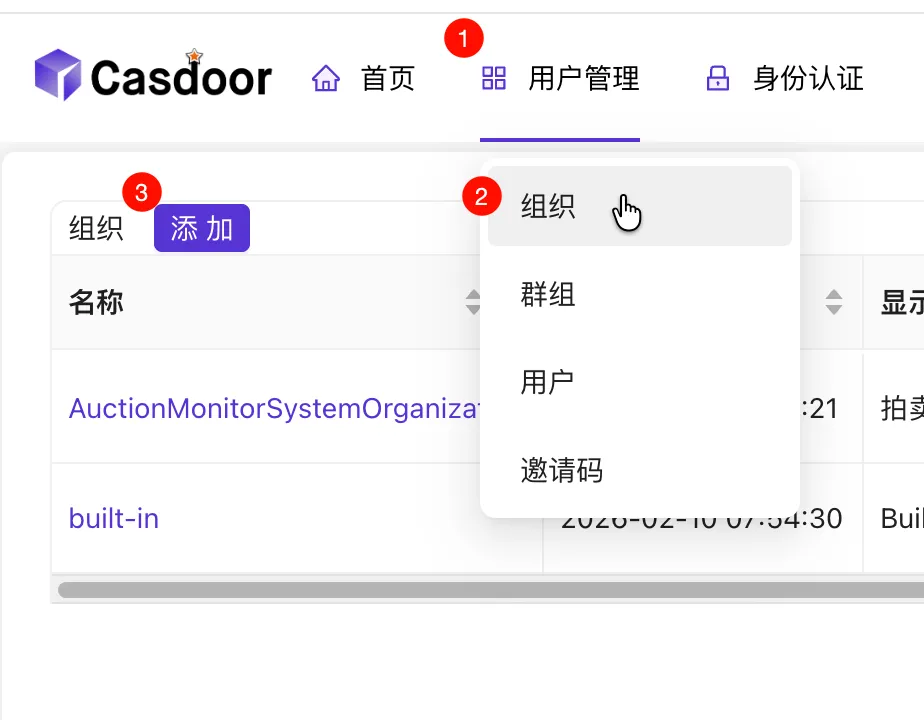
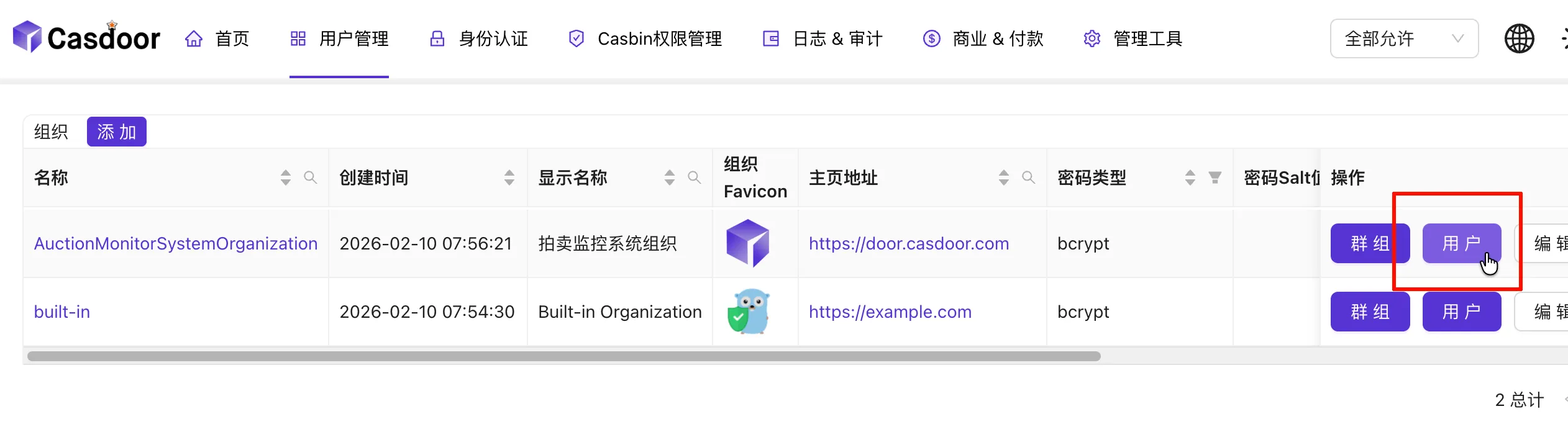
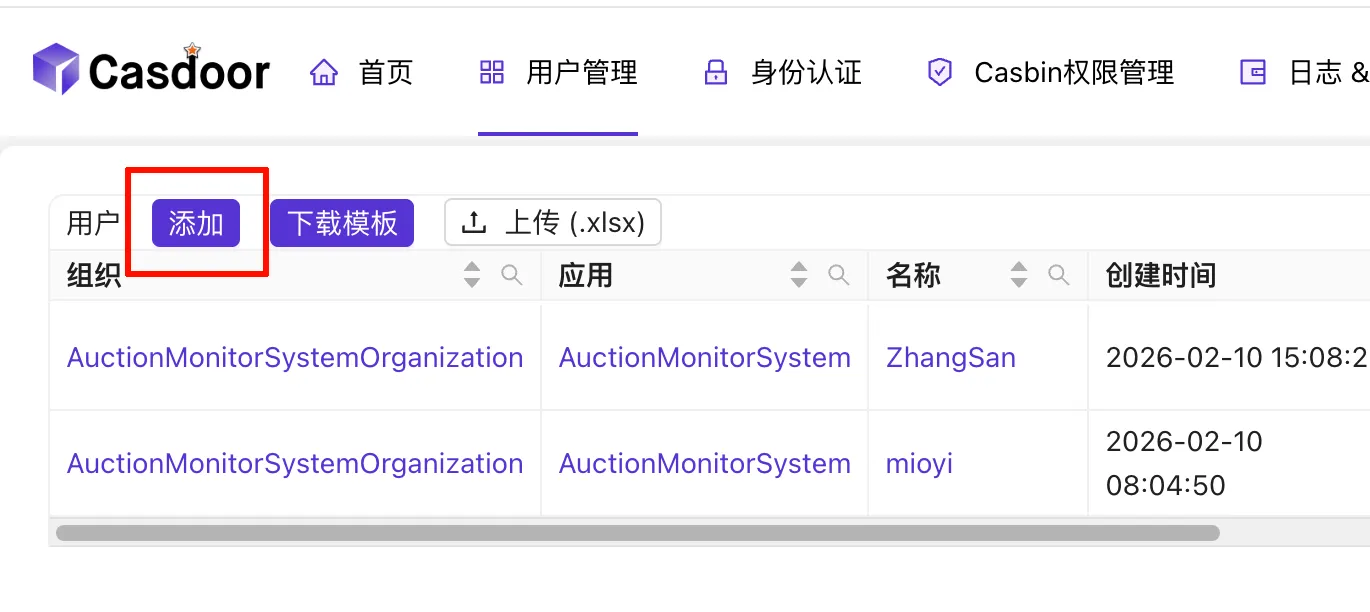
Create Users under this organization.
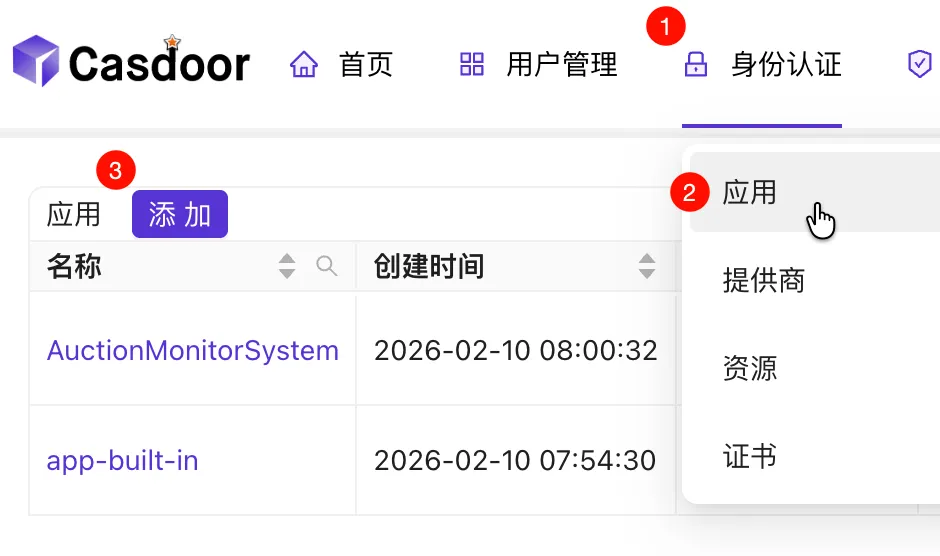
Create an Application.
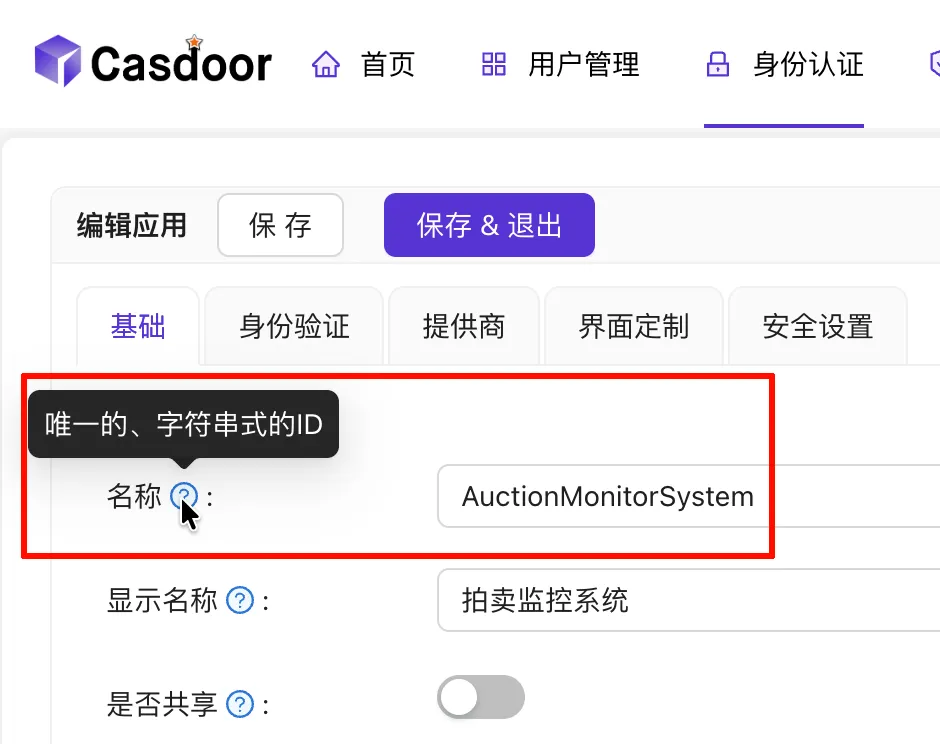
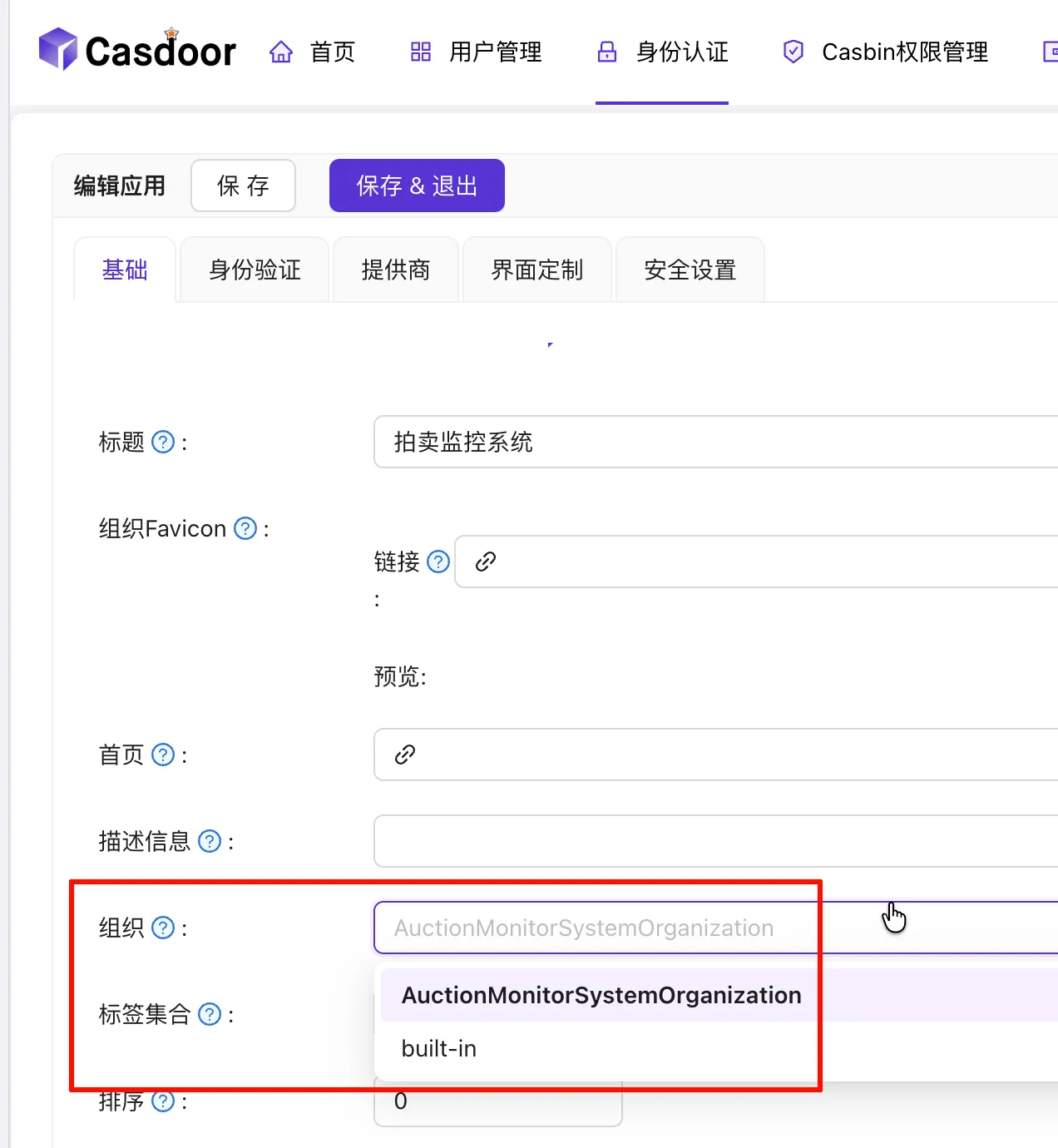
Enter a name for the application (record this).
Select the organization created earlier.
Fill in the (frontend) redirect URL (refer to the previous workflow) and record the ID and Secret. In 3️⃣, select
JWT-Custom; in 4️⃣, selectOwnerandName(used for subsequent permission verification).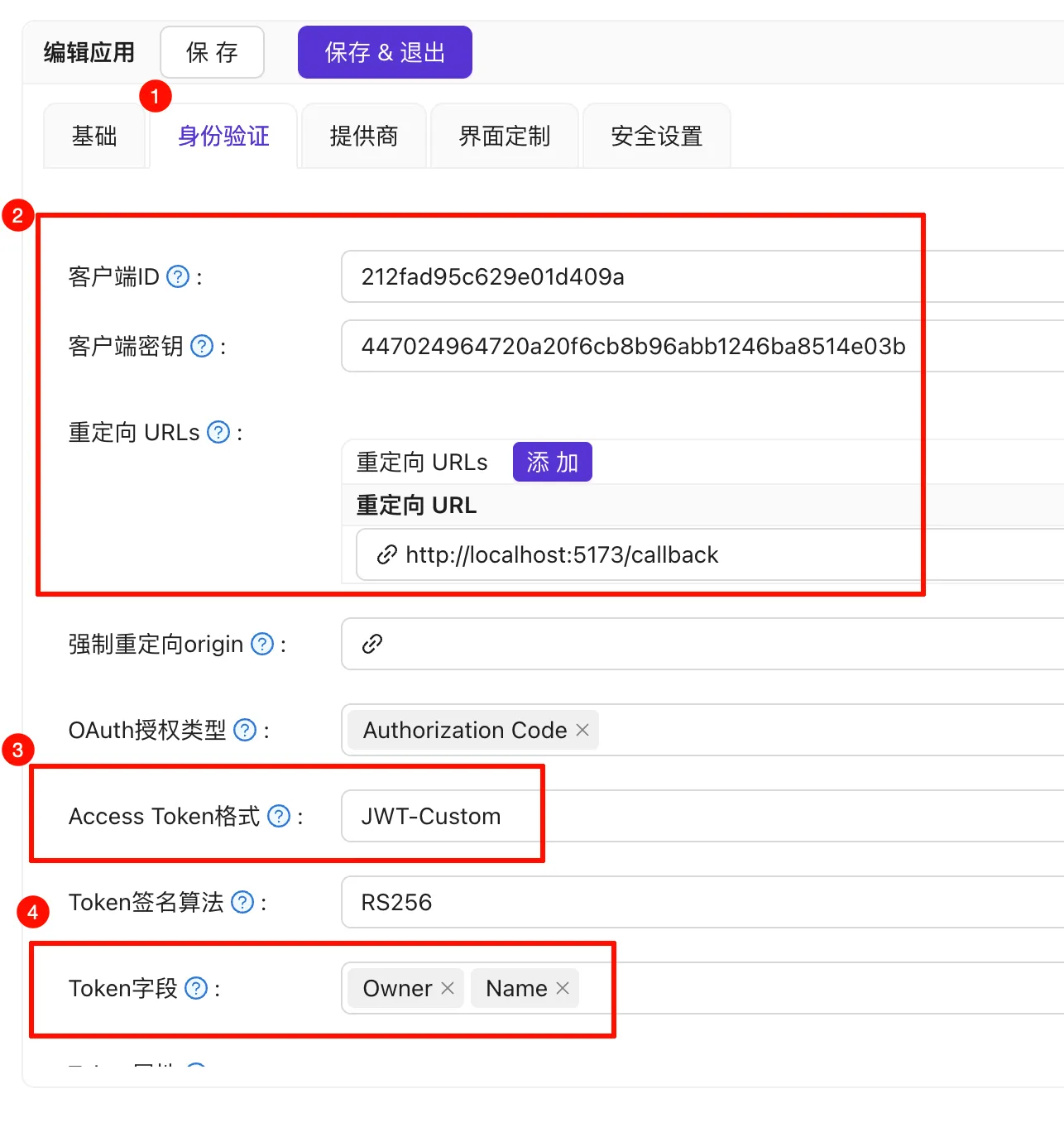
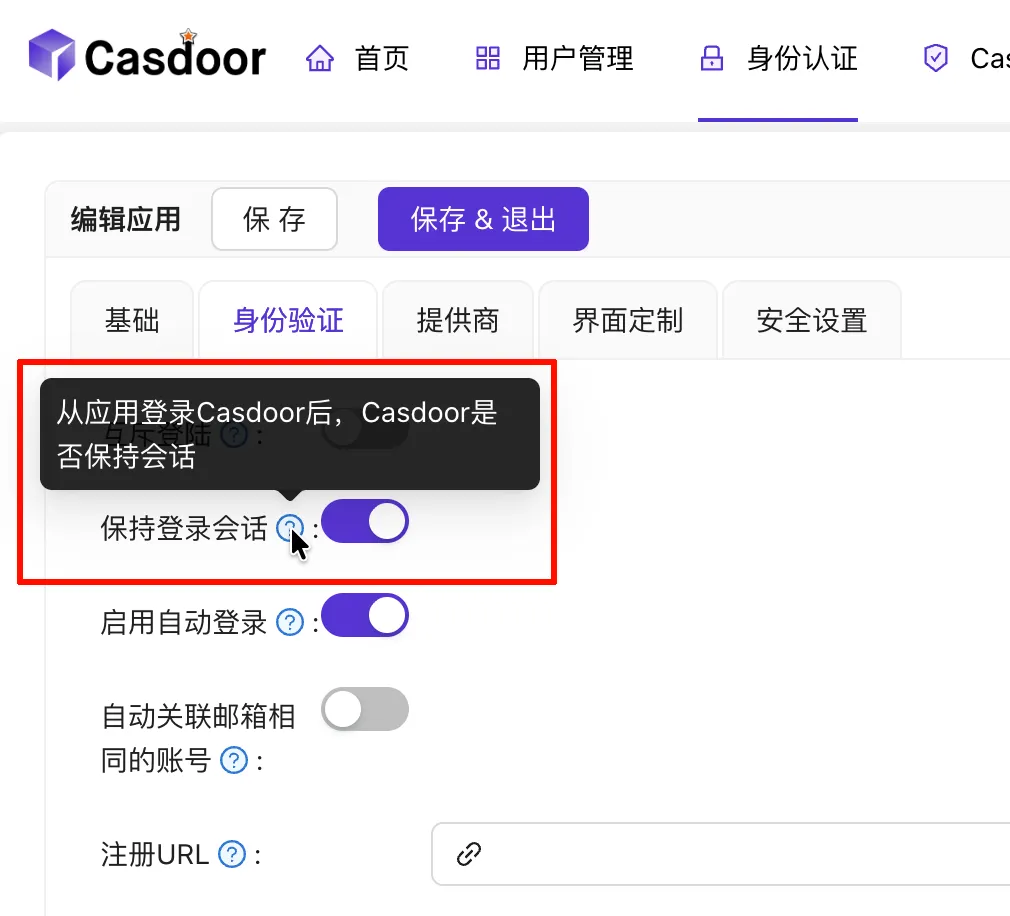
Since we let Casdoor fully manage user information, it is recommended to enable this option so that logging into the app also logs you into Casdoor. Explore other configurations as needed.
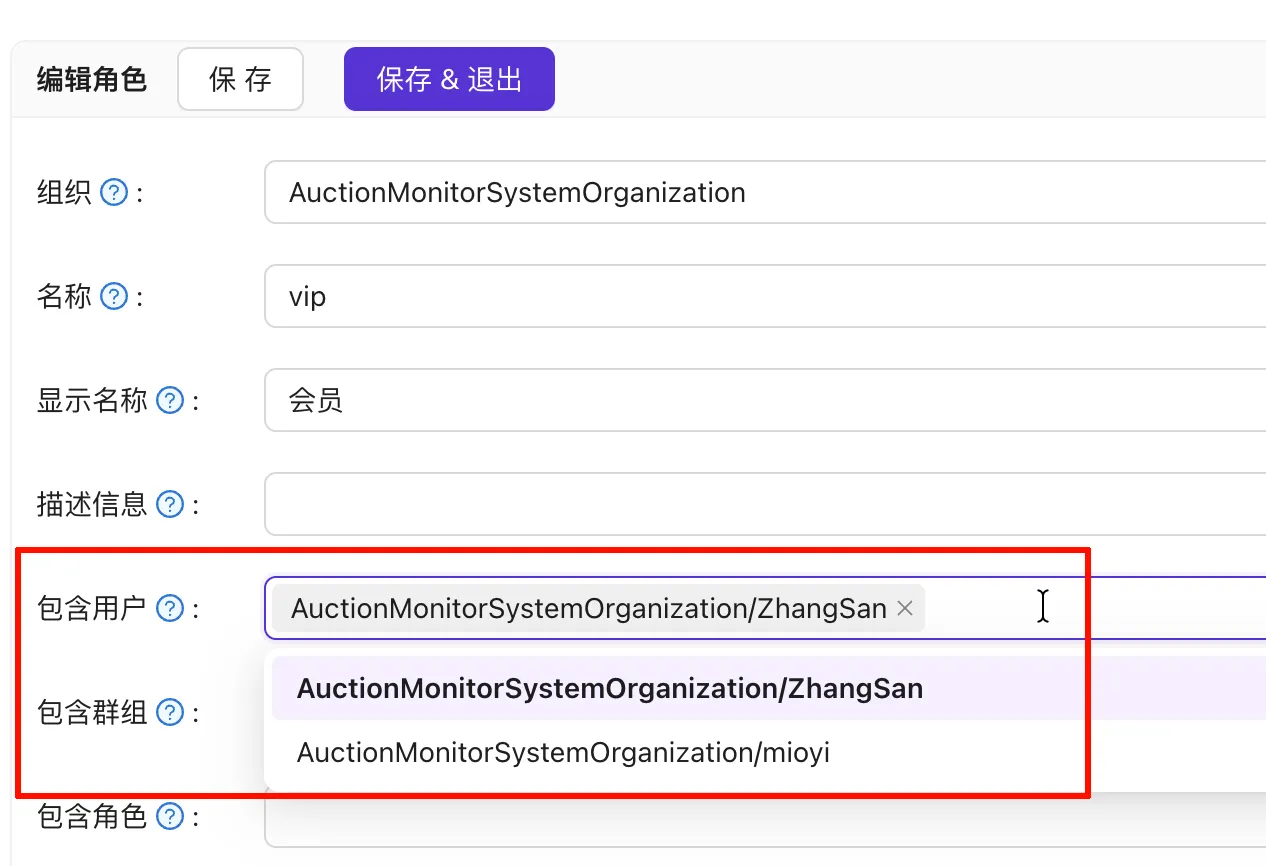
Add Roles (usually
adminanduserare enough) and assign users to roles. Roles can also inherit from each other; for example, if VIPs also have admin rights, you can configure theviprole to inherit theadminrole.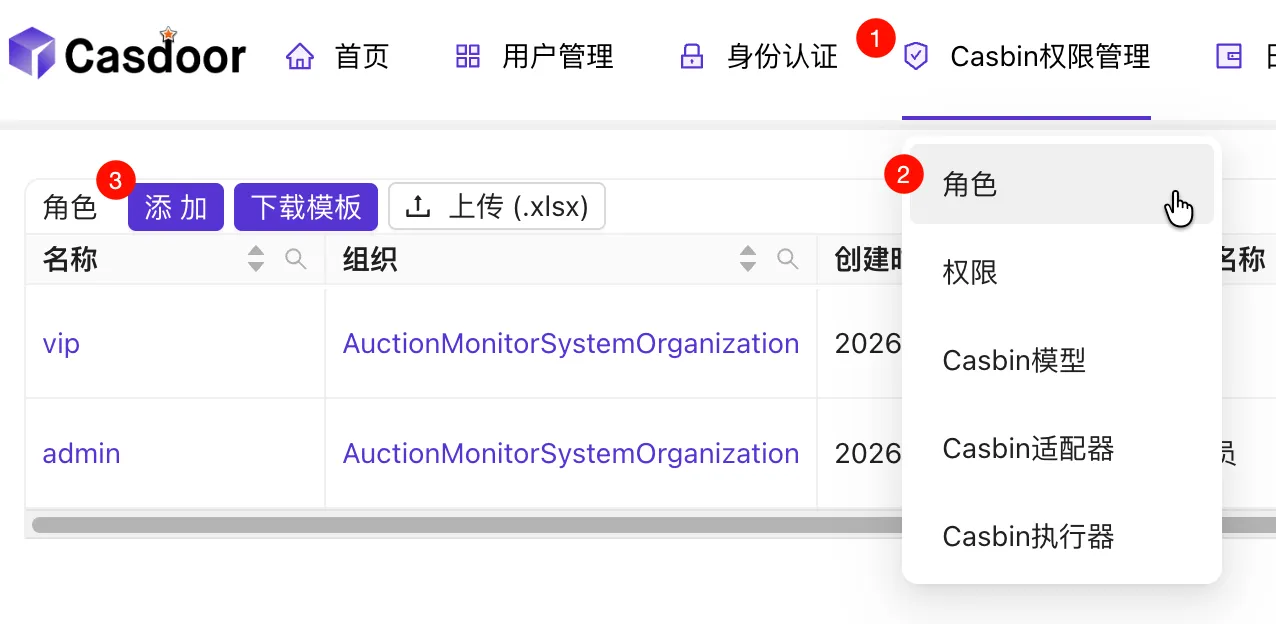
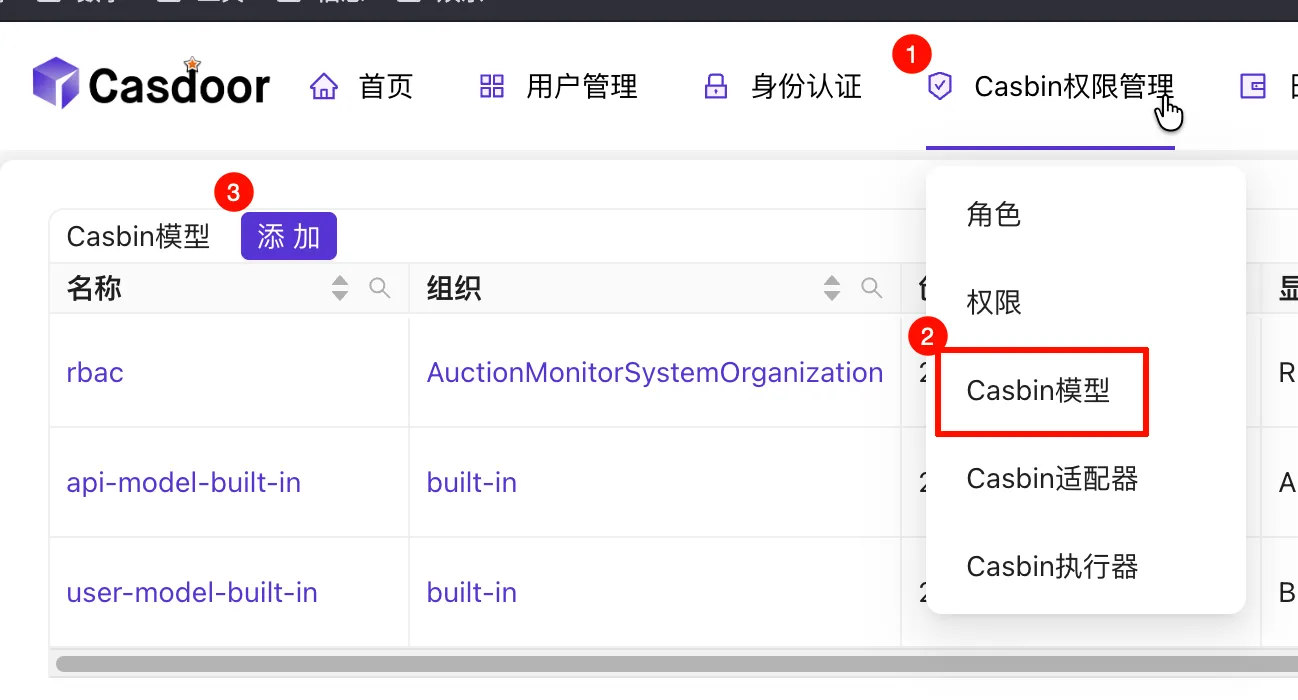
Set up the Casbin model—you can copy this directly:
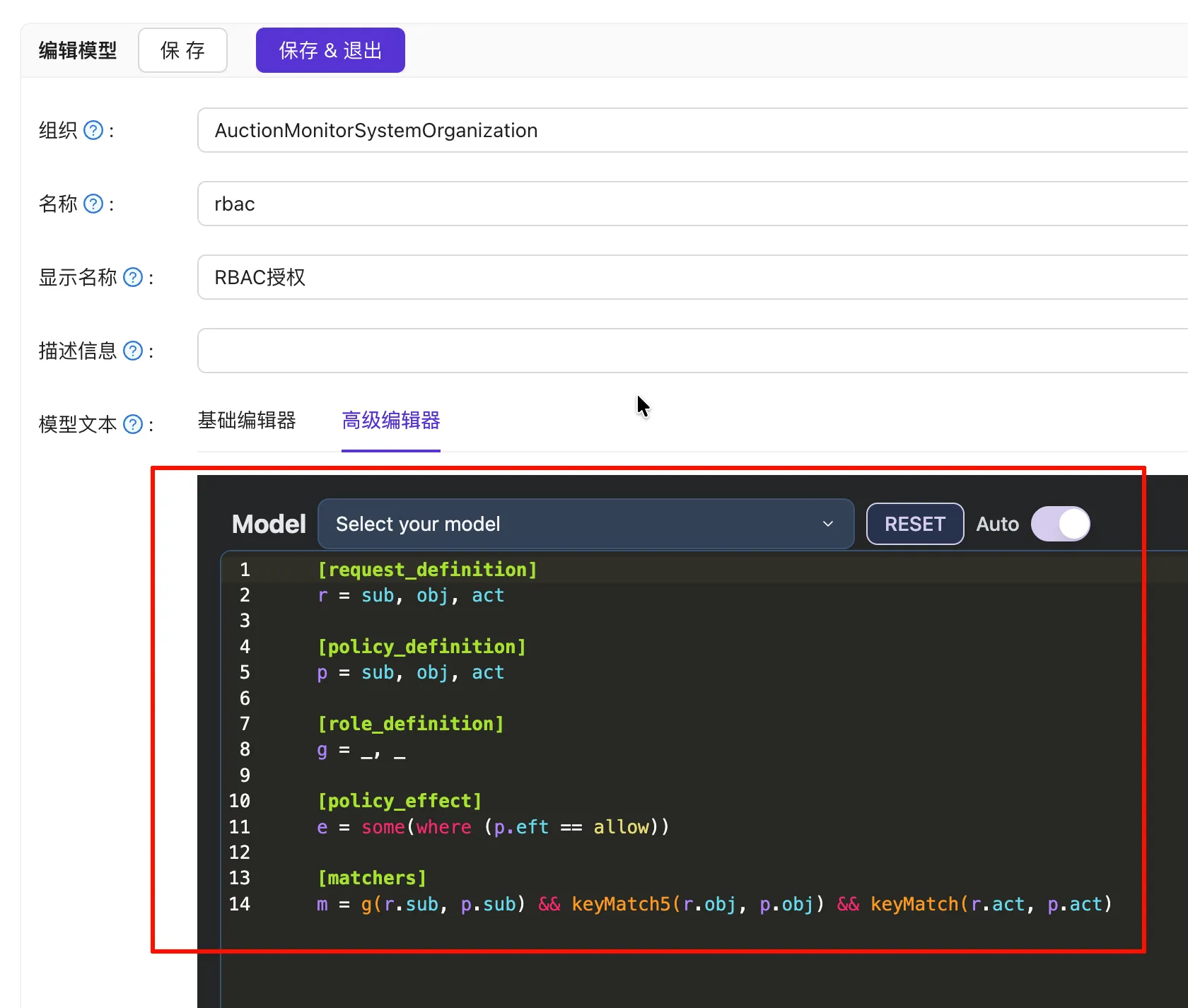
[request_definition] r = sub, obj, act [policy_definition] p = sub, obj, act [role_definition] g = _, _ [policy_effect] e = some(where (p.eft == allow)) [matchers] m = g(r.sub, p.sub) && keyMatch5(r.obj, p.obj) && keyMatch(r.act, p.act)Add permissions as required.
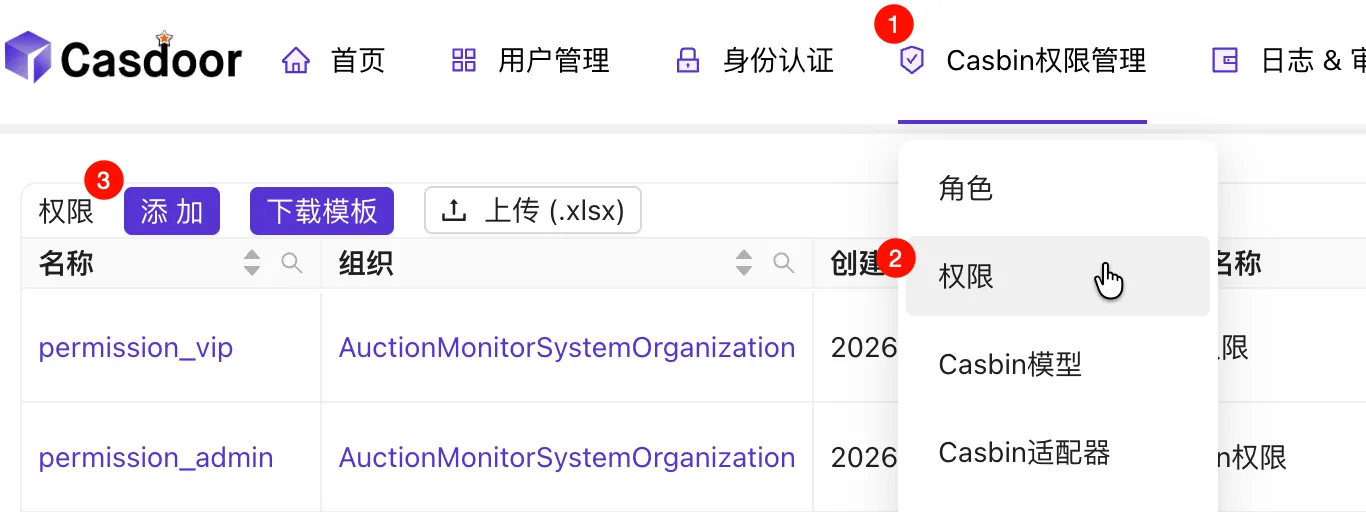
Follow the example in the image (Resources and Actions can use wildcard
*; Resources can also use path param wildcards like/api/user/{id}, see https://www.casbin.org/docs/function).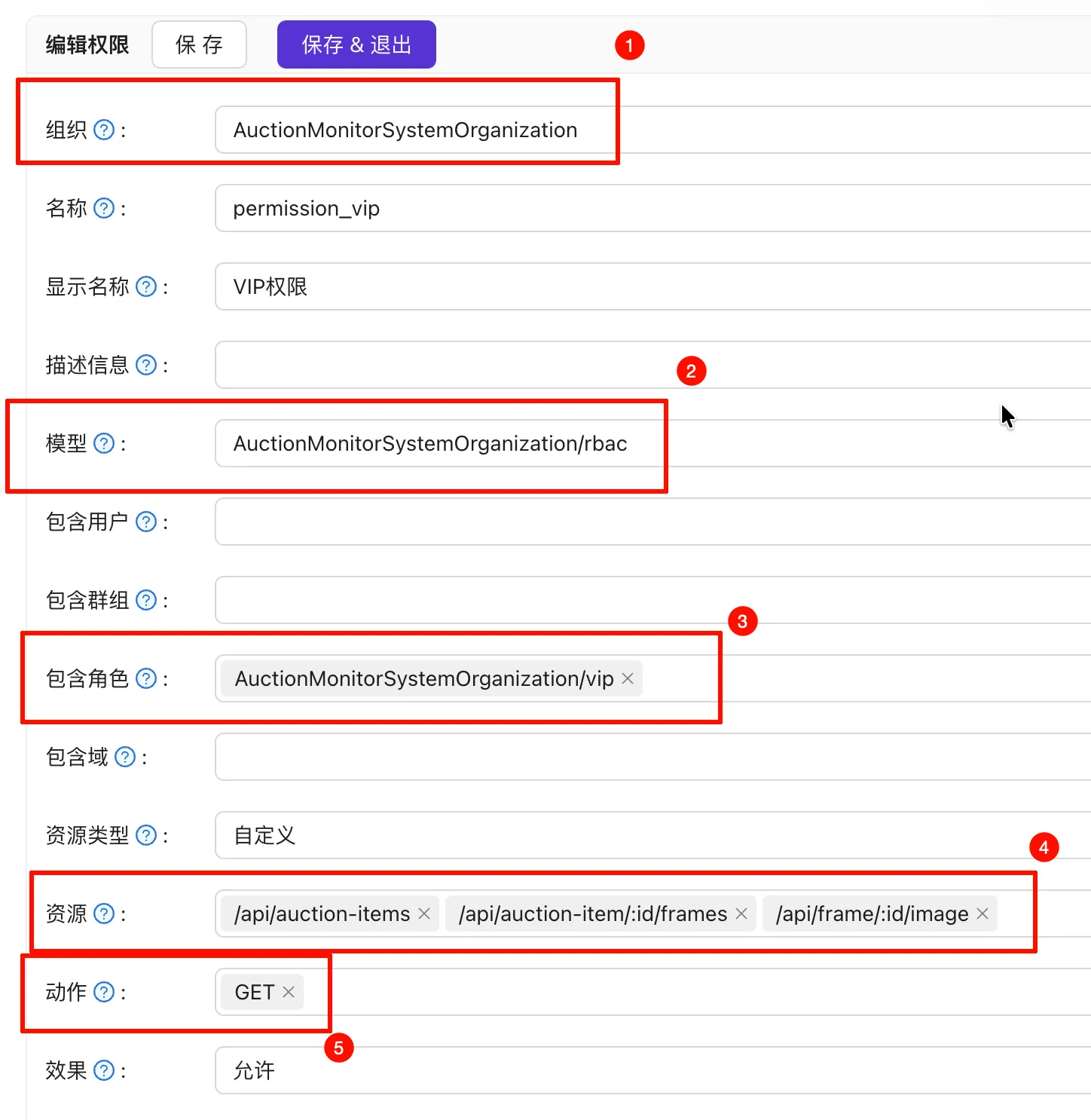
Download the JWT Public Key for verification.
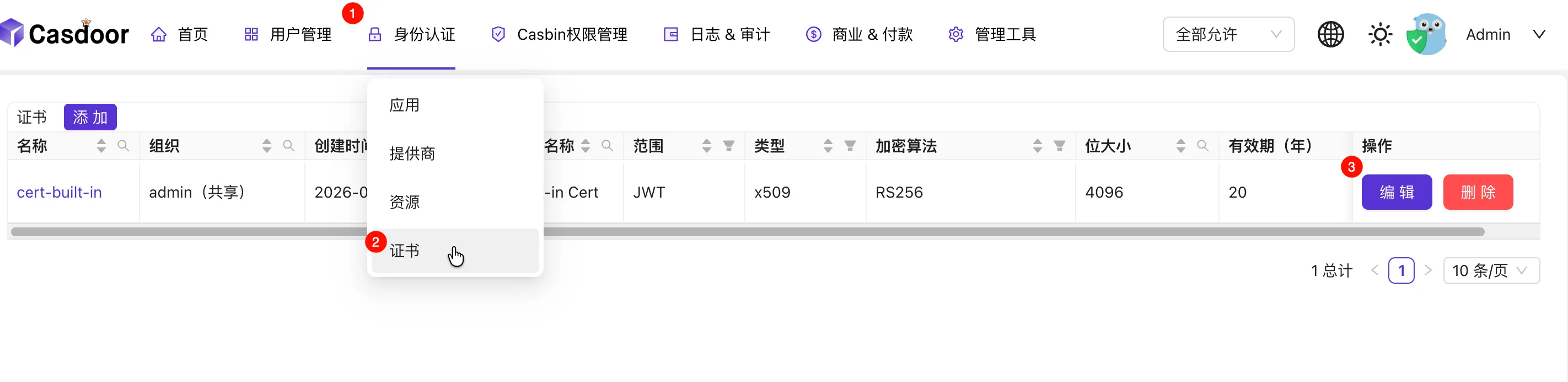
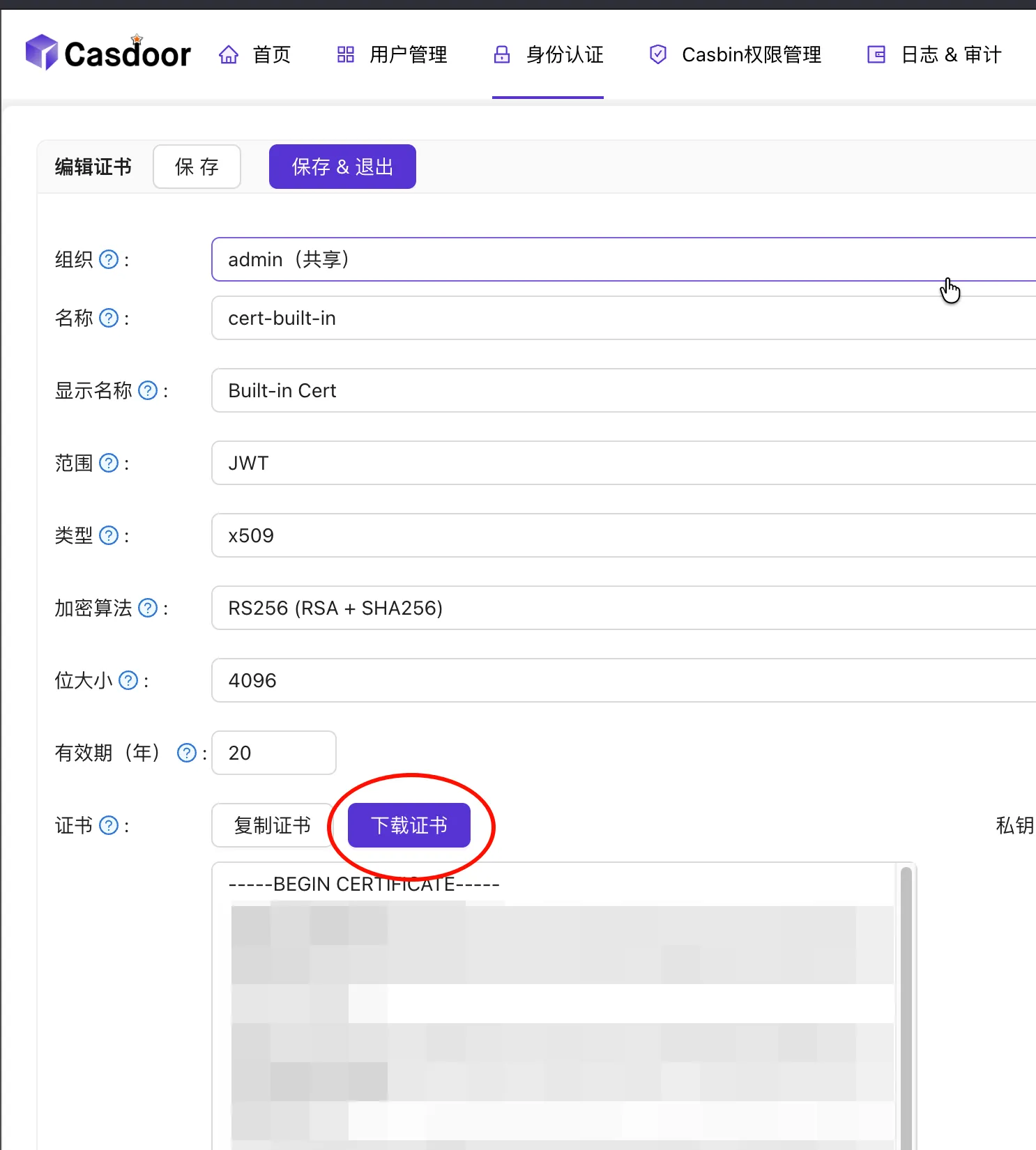
Backend Configuration
Note
Example using Go + Fiber.
Configure environment variables:
ORG_NAME="AuctionMonitorSystemOrganization" OIDC_TOKEN_ENDPOINT="http://localhost:8000/api/login/access_token" CLIENT_ID="212fad95c629e01d409a" CLIENT_SECRET="447024964720a20f6cb8b96abb1246ba8514e03b" CASDOOR_ENFORCE_URL="http://localhost:8000/api/enforce" FRONTEND_URL="http://localhost:5173" # For CORS configurationConfigure Middleware. Notes:
- Middleware is responsible for extracting the Access Token from Cookies, parsing/verifying the JWT, and calling the Casdoor API for authorization. If you aren’t using Casdoor, perform Casbin checks manually after getting the role.
- Public APIs cannot be managed by Casdoor and must be configured manually in the middleware.
- Parsing the JWT verifies its integrity (using the previously downloaded public key).
- The
OwnerandNamein JWT Claims are used for authorization. The subject isOwner/Name, the object is the route, and the action is the HTTP method.
1 2 3 4 5 6 7 8 9 10 11 12 13 14 15 16 17 18 19 20 21 22 23 24 25 26 27 28 29 30 31 32 33 34 35 36 37 38 39 40 41 42 43 44 45 46 47 48 49 50 51 52 53 54 55 56 57 58 59 60 61 62 63 64 65 66 67 68 69 70 71 72 73package auth import ( "crypto/rsa" _ "embed" "fmt" "strings" "github.com/gofiber/fiber/v3" "github.com/golang-jwt/jwt/v5" ) const AccessTokenCookie = "access_token" func Middleware() fiber.Handler { return func(c fiber.Ctx) error { if strings.HasPrefix(c.Path(), "/api/auth") { return c.Next() } claims, err := parseJwt(c.Cookies(AccessTokenCookie)) if err != nil { return fiber.NewErrorf(fiber.StatusUnauthorized, "JWT parsing failed: %s", err) } if claims == nil { return fiber.ErrUnauthorized } res, err := Enforce(c.Context(), fmt.Sprintf("%s/%s", claims.Owner, claims.Name), c.Path(), c.Method()) if err != nil { return fiber.NewErrorf(fiber.StatusUnauthorized, "Enforce failed: %s", err.Error()) } if !res { return fiber.ErrUnauthorized } return c.Next() } } //go:embed token_jwt_key.pem var publicKeyString []byte var publicKey = func() *rsa.PublicKey { result, err := jwt.ParseRSAPublicKeyFromPEM(publicKeyString) if err != nil { panic(err) } return result }() type customClaims struct { Owner string `json:"owner"` Name string `json:"name"` jwt.RegisteredClaims } func parseJwt(token string) (*customClaims, error) { if len(token) == 0 { return nil, nil } jwtToken, err := jwt.ParseWithClaims(token, &customClaims{}, func(_ *jwt.Token) (any, error) { return publicKey, nil }) if err != nil { return nil, err } if claims, ok := jwtToken.Claims.(*customClaims); ok && jwtToken.Valid { return claims, nil } return nil, fiber.ErrUnauthorized }Write code to call Casdoor APIs. One calls
/api/login/access_tokento exchange the code for an AccessToken; the other calls enforce based onsub,obj, andact. See https://demo.casdoor.com/swagger/ and https://casdoor.org/docs/permission/exposed-casbin-apis for API details.1 2 3 4 5 6 7 8 9 10 11 12 13 14 15 16 17 18 19 20 21 22 23 24 25 26 27 28 29 30 31 32 33 34 35 36 37 38 39 40 41 42 43 44 45 46 47 48 49 50 51 52 53 54 55 56 57 58 59 60 61 62 63 64 65 66 67 68 69 70 71 72 73 74 75 76 77 78 79 80 81 82 83 84 85 86 87 88 89 90 91 92 93 94 95 96 97 98 99 100 101 102package auth import ( "context" "errors" "auction-monitor-system/util" "github.com/gofiber/fiber/v3" "github.com/gofiber/fiber/v3/client" ) type Token struct { AccessToken string `json:"access_token"` ExpiresIn int `json:"expires_in"` IdToken string `json:"id_token"` RefreshToken string `json:"refresh_token"` Scope string `json:"scope"` TokenType string `json:"token_type"` } type tokenRequest struct { GrantType string `json:"grant_type"` ClientId string `json:"client_id"` ClientSecret string `json:"client_secret"` Code string `json:"code"` } var tokenEndpoint = util.GetEnv("OIDC_TOKEN_ENDPOINT") var clientId = util.GetEnv("CLIENT_ID") var clientSecret = util.GetEnv("CLIENT_SECRET") func GetToken(ctx context.Context, code string) (*Token, error) { logger := util.LoggerFromCtx(ctx, util.RequestIdKey) logger.Info().Str("code", code).Msg("Starting Token acquisition") resp, err := util.HttpClient.Post(tokenEndpoint, client.Config{ Ctx: ctx, Body: tokenRequest{ GrantType: "authorization_code", ClientId: clientId, ClientSecret: clientSecret, Code: code, }, }) if err != nil { logger.Error().Err(err).Msg("HTTP request failed") return nil, err } if err = util.CheckResp(resp); err != nil { logger.Error().Err(err).Msg("HTTP request error") return nil, err } var token Token if err = resp.JSON(&token); err != nil { logger.Error().Err(err).Msg("JSON parsing failed") return nil, err } logger.Info().Msg("Token acquired successfully") return &token, nil } var orgName = util.GetEnv("ORG_NAME") var casdoorEnforceUrl = util.GetEnv("CASDOOR_ENFORCE_URL") func Enforce(ctx context.Context, sub, obj, act string) (bool, error) { logger := util.LoggerFromCtx(ctx, util.RequestIdKey) resp, err := util.HttpClient.Post("http://localhost:8000/api/enforce", client.Config{ Ctx: ctx, Param: map[string]string{ "owner": orgName, }, Header: map[string]string{ fiber.HeaderAuthorization: util.BasicAuth(clientId, clientSecret), }, Body: []string{sub, obj, act}, }) if err != nil { logger.Error().Err(err).Msg("HTTP request failed") return false, err } if err = util.CheckResp(resp); err != nil { logger.Error().Err(err).Msg("HTTP request error") return false, err } var result struct { Data []bool `json:"data"` Msg string `json:"msg"` } if err := resp.JSON(&result); err != nil { logger.Error().Err(err).Msg("JSON parsing failed") return false, err } if result.Data == nil { return false, errors.New(result.Msg) } return result.Data[0], nil }Expose backend APIs to the frontend. Note: We use HttpOnly Cookies for security over
localStorage.1 2 3authGroup := router.Group("/auth") authGroup.Post("/exchange", h.ExchangeAccessToken) authGroup.Post("/logout", h.Logout)1 2 3 4 5 6 7 8 9 10 11 12 13 14 15 16 17 18 19 20 21 22 23 24 25 26 27 28 29 30 31 32 33 34 35 36 37 38 39 40 41 42 43 44 45 46 47 48 49package api import ( "fmt" "auction-monitor-system/auth" "auction-monitor-system/util" "github.com/gofiber/fiber/v3" ) func (h *Handler) ExchangeAccessToken(c fiber.Ctx) error { logger := util.LoggerFromCtx(c.Context(), util.RequestIdKey) logger.Info().Msg("Starting Token exchange") var body struct { Code string `json:"code"` } if err := c.Bind().JSON(&body); err != nil { logger.Error().Err(err).Msg("JSON parsing failed") return fiber.NewErrorf(fiber.StatusBadRequest, "JSON parsing failed: %s", err) } resp, err := auth.GetToken(c.Context(), body.Code) if err != nil { logger.Error().Err(err).Msg("Token acquisition failed") return fmt.Errorf("token acquisition failed: %w", err) } logger.Info().Msg("Token exchange successful") c.Cookie(&fiber.Cookie{ Name: auth.AccessTokenCookie, Value: resp.AccessToken, HTTPOnly: true, SameSite: fiber.CookieSameSiteStrictMode, Path: "/api", MaxAge: resp.ExpiresIn, }) return c.JSON(empty) } func (h *Handler) Logout(c fiber.Ctx) error { c.Cookie(&fiber.Cookie{ Name: auth.AccessTokenCookie, Value: "", Path: "/api", MaxAge: -1, }) return c.JSON(empty) }Configure CORS
1 2 3 4app.Use(cors.New(cors.Config{ AllowCredentials: true, AllowOrigins: []string{util.GetEnv("FRONTEND_URL")}, }))
Frontend Configuration
Note
Example using Preact, Vite, and TanStack Query.
Configure environment variables (
.env.development):VITE_AUTHORIZATION_ENDPOINT="<casdoor-url>/login/authorize" # Login URL VITE_CLIENT_ID="212fad95c629e01d409a" # Client ID VITE_APP_NAME="AuctionMonitorSystem" # App Name VITE_APP_URL="http://localhost:5173" # Frontend URL VITE_CALLBACK_ROUTE="/callback" # Callback Route VITE_BACKEND_URL="http://localhost:3000" # Backend URLCreate the Login URL (Direct the user via an
<a>link; the login page also supports registration):1 2 3 4 5 6 7 8 9 10export const loginUrl = import.meta.env.VITE_AUTHORIZATION_ENDPOINT + "?" + new URLSearchParams({ client_id: import.meta.env.VITE_CLIENT_ID, redirect_uri: import.meta.env.VITE_APP_URL + "/callback", response_type: "code", scope: "openid", state: import.meta.env.VITE_APP_NAME, }).toString();Configure the Callback Page (Since the Token is in a Cookie, the response body doesn’t need manual processing):
1 2 3 4 5 6 7 8 9 10 11 12 13 14 15 16 17 18 19 20 21 22 23import { api } from "../util/api.ts"; import { useMutation } from "@tanstack/react-query"; import { useLocation } from "preact-iso"; import { useEffect, useMemo } from "preact/hooks"; export default function CallbackPage() { const location = useLocation(); const code = useMemo(() => location.query["code"], [location]); const { mutate, isError, error } = useMutation({ mutationFn: (code: string) => api.apiAuthExchangePost({ code: { code } }), onSuccess: () => location.route("/", true), // Redirect to home after success }); useEffect(() => { if (code) mutate(code); }, [code]); if (!code) return <p>Error: No authorization code</p>; if (isError) return <p>Error: {error.message}</p>; return <p>Waiting for authentication...</p>; }Configure
fetch: Since we use HttpOnly Cookies, manual Token setting is unnecessary. Tokens are sent automatically, but you must includecredentials: "include".To Log out, call the backend API to clear the cookie and, if needed, call
<casdoor-url>/api/logout.To Edit Personal Info, redirect users to
<casdoor-url>/account. If the frontend needs to display user info, it necessitates backend coordination.
Aside: While OpenAPI can be slightly verbose to write, it generates documentation, enables API debugging, and creates frontend HttpClient boilerplate. Combined with TanStack Query, it significantly boosts efficiency.
Advantages of Casdoor
Massive support for third-party logins (practically anything OAuth-compatible).
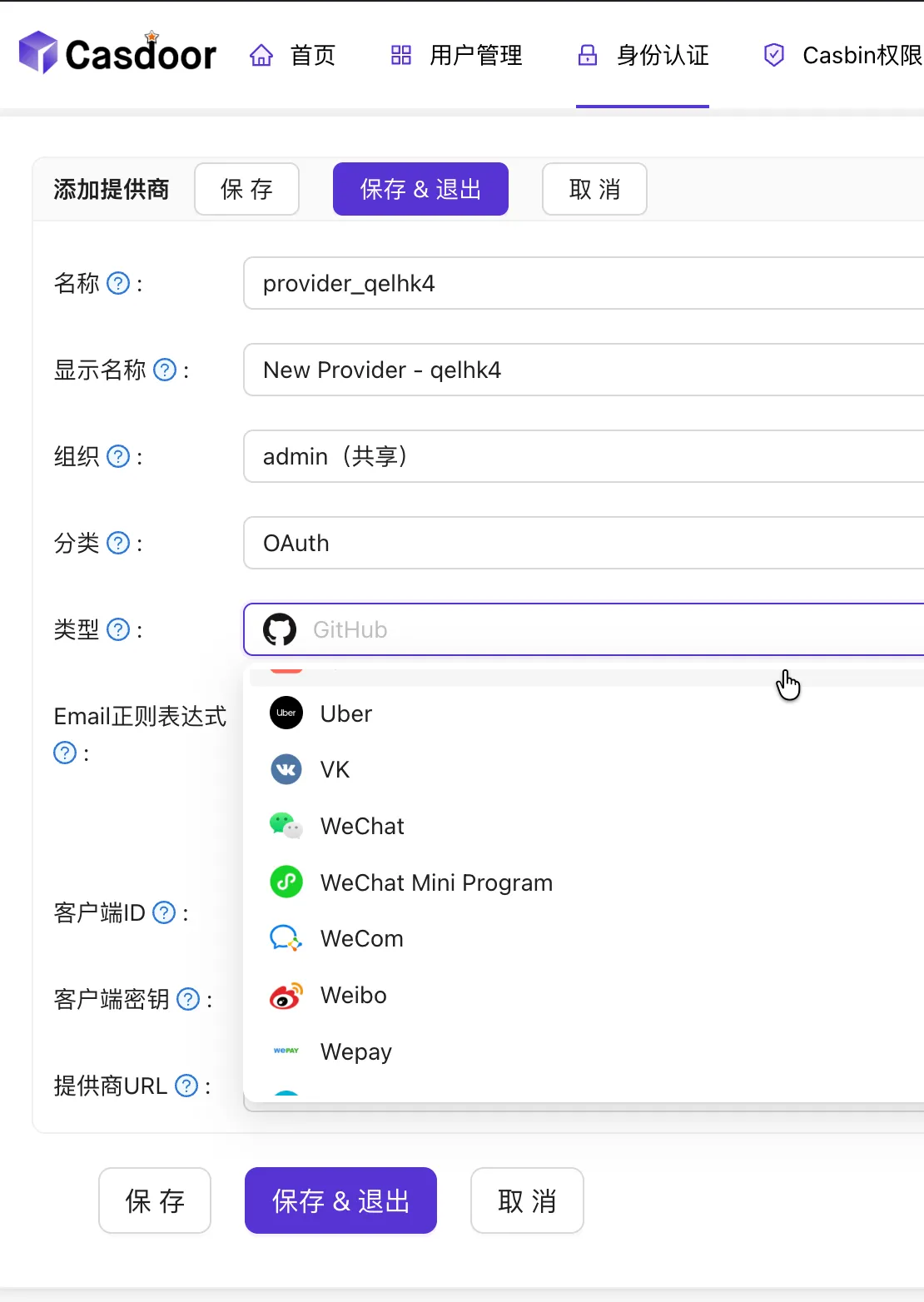
Convenient SaaS features (Invitation codes, verification codes, payments, etc.).
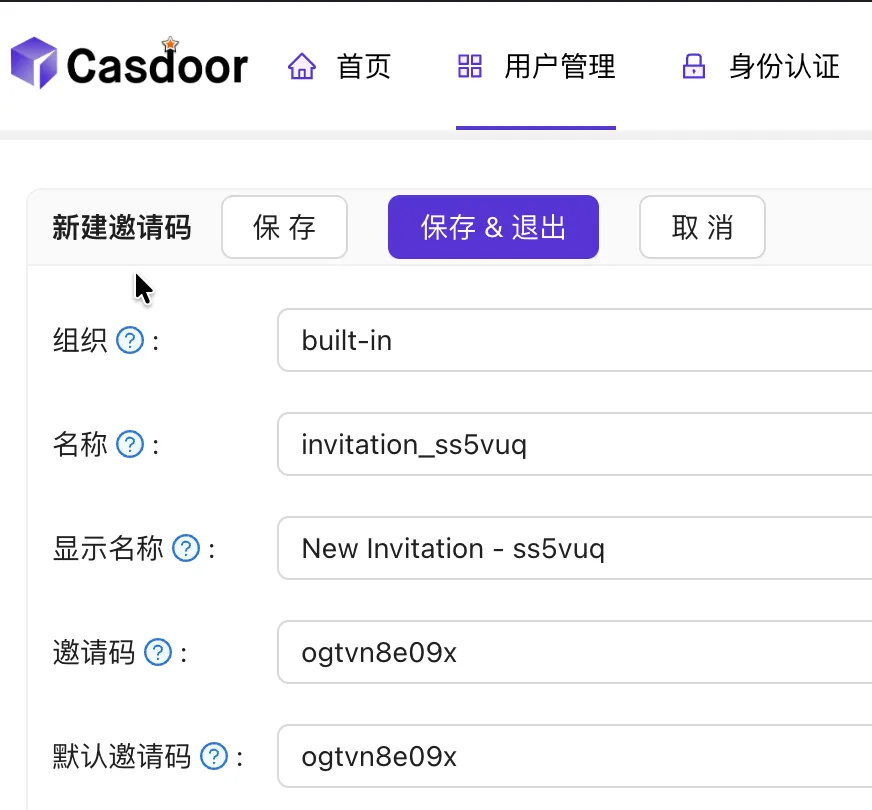
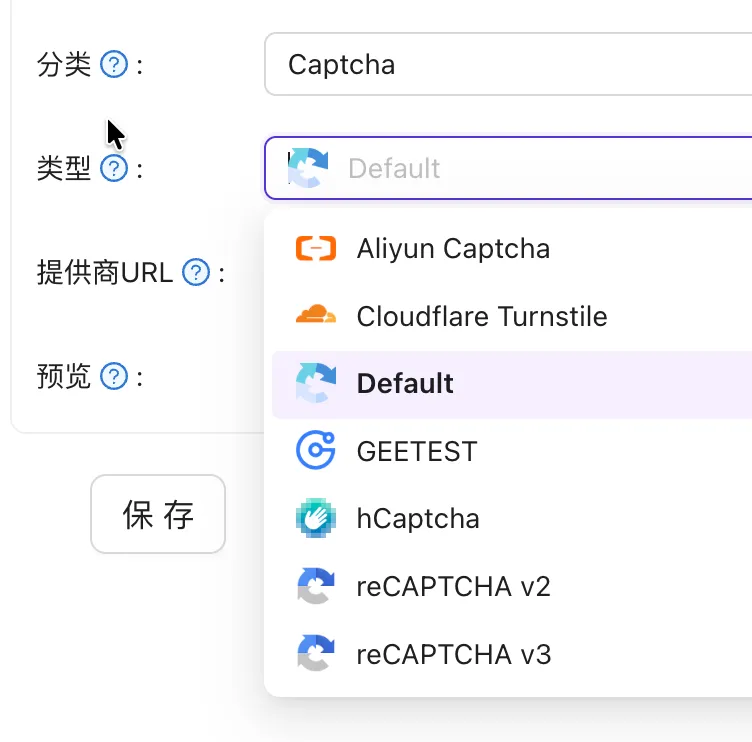
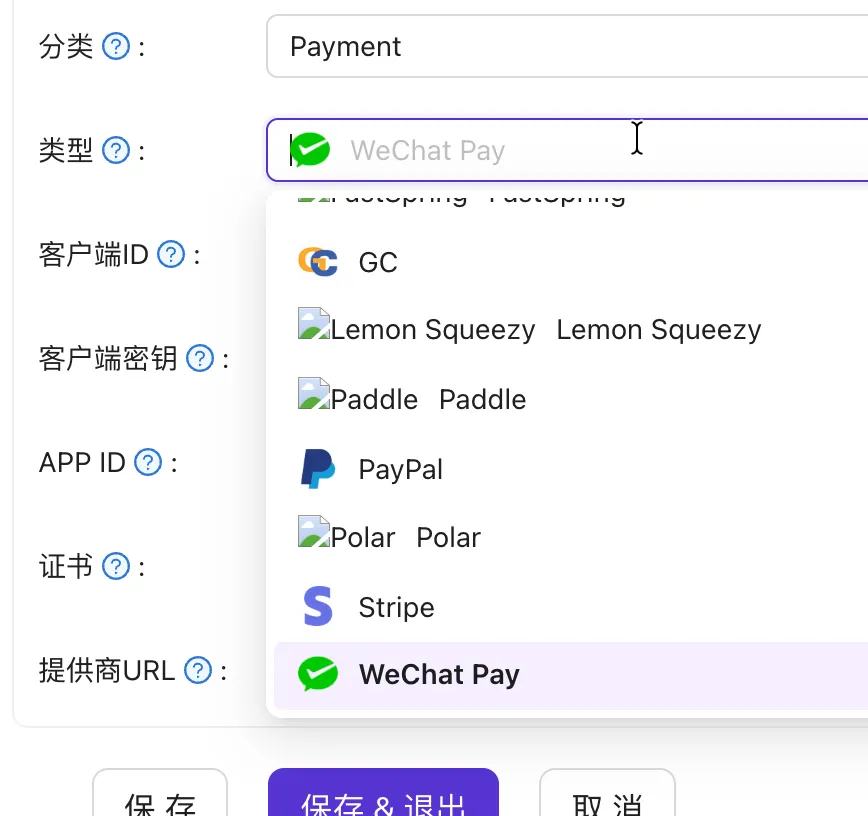
- Observability (Logs, auditing, system monitoring).
- Written in Golang for high performance.
Alternative Authorization Scheme
Since Casdoor cannot automatically grant roles during user registration (it is possible via API, but complex), here is a Group-based authorization method.
Assuming the previous steps are completed:
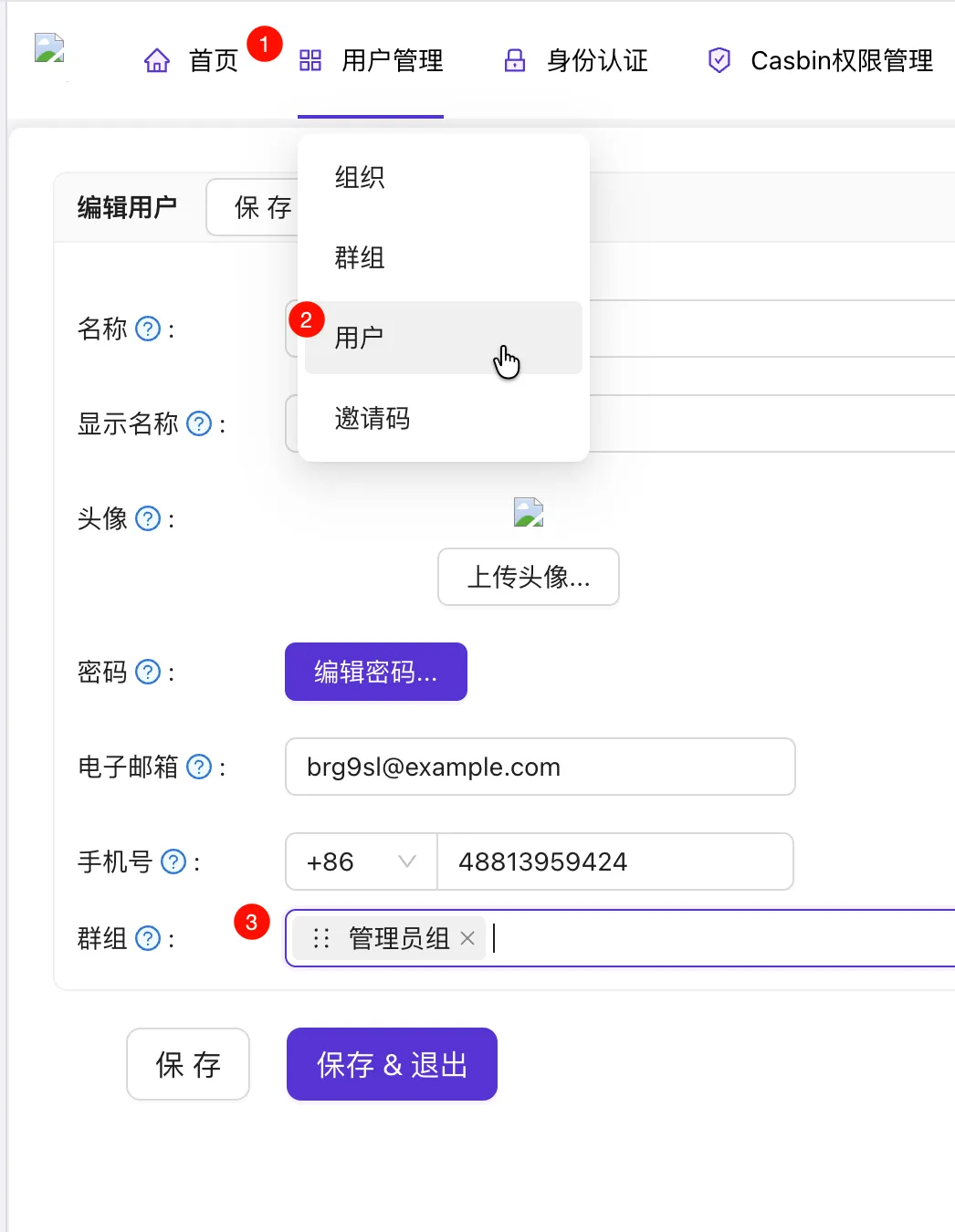
Modify JWT Claims. We need to include Group info for group authentication.
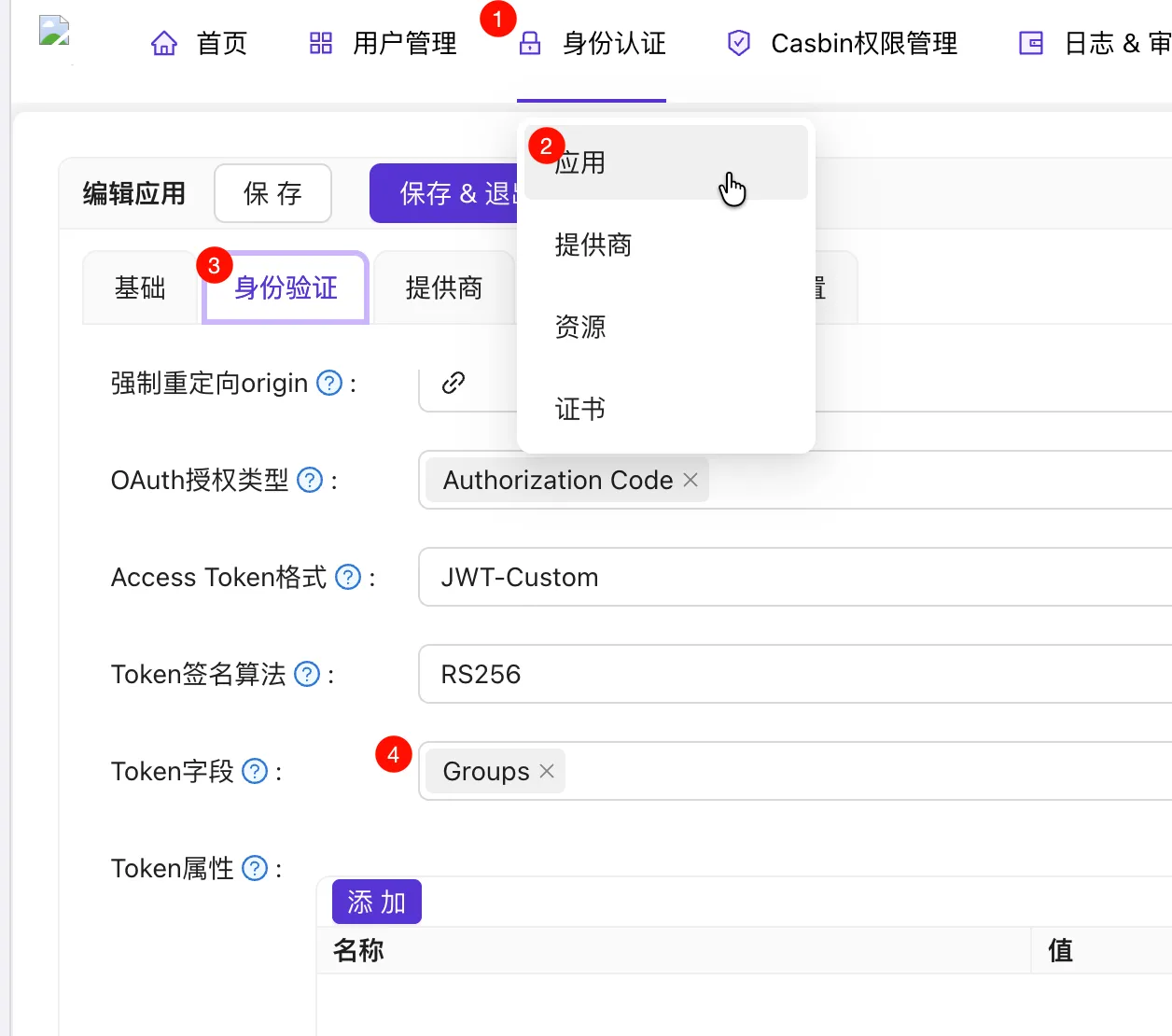
Add some groups and assign users to them. Example:
admin_groupandvip_group.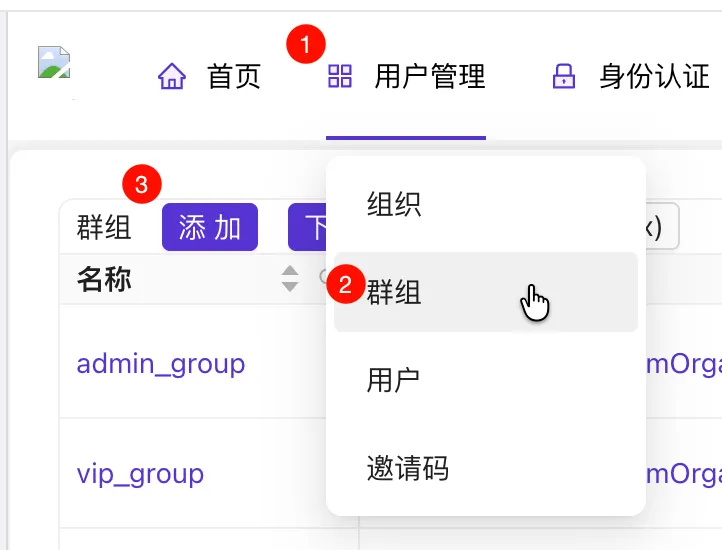
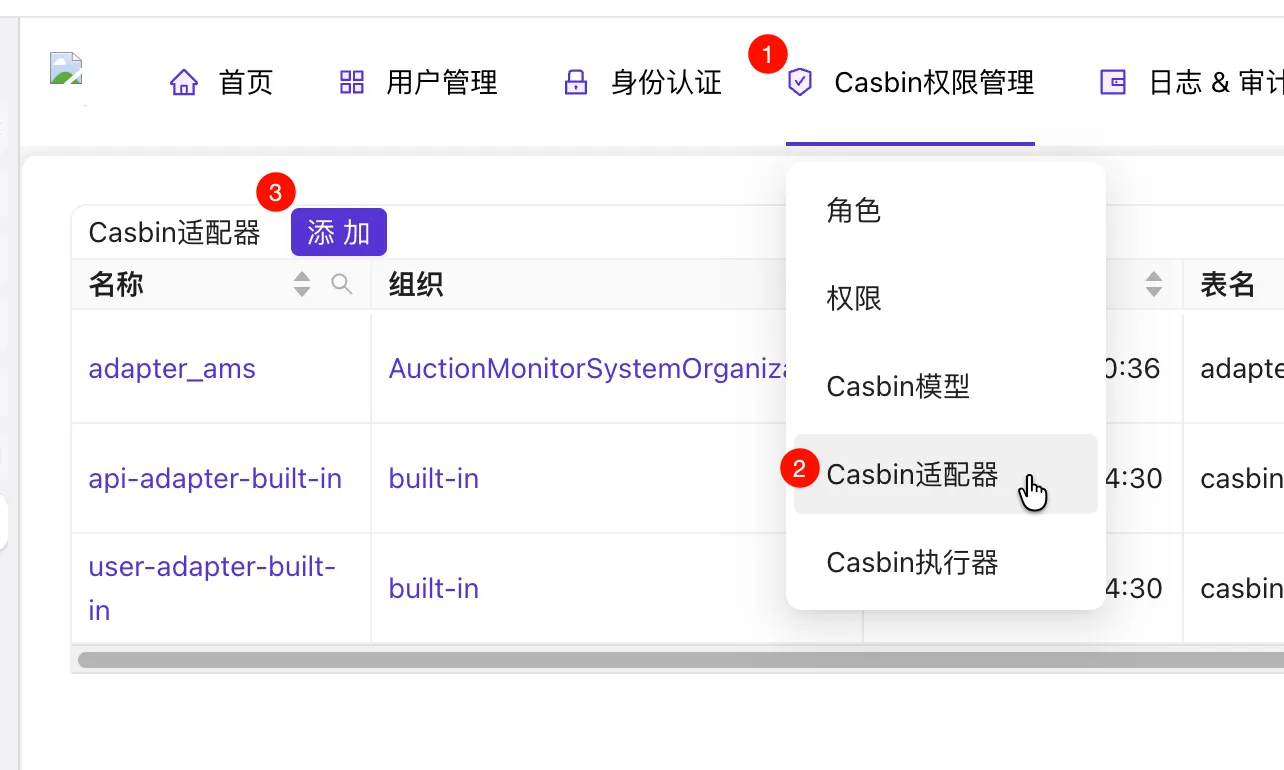
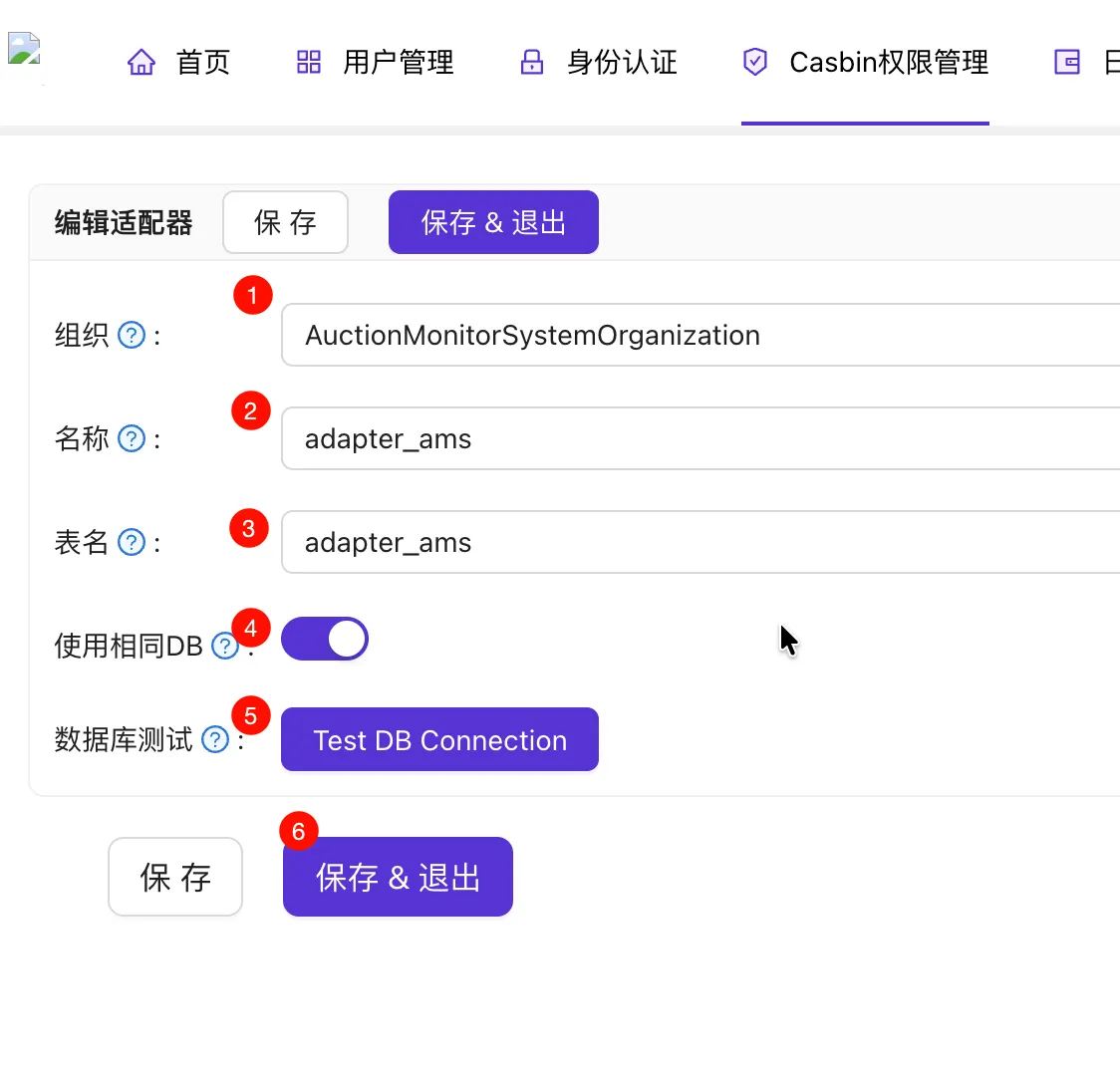
The Casbin model remains the same, but we create a Casbin Adapter to store the policy.
You must click “Test DB Connection” for Casbin to create the database tables.
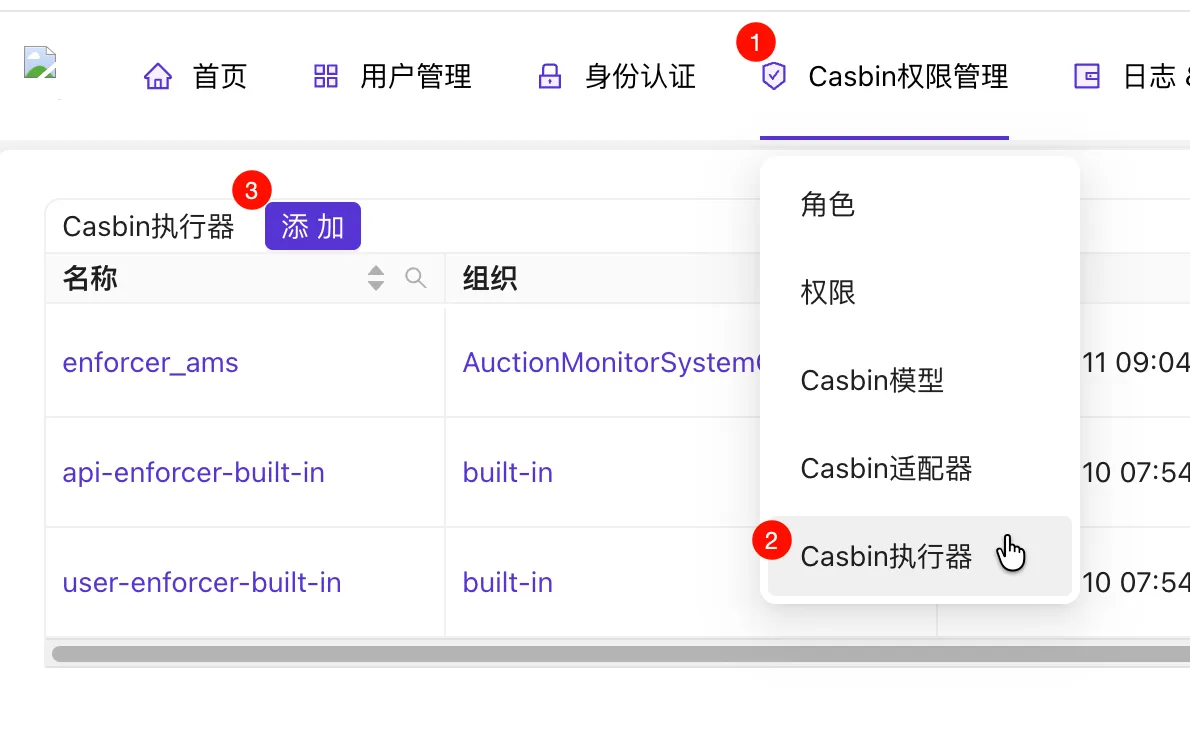
Add a Casbin Enforcer.
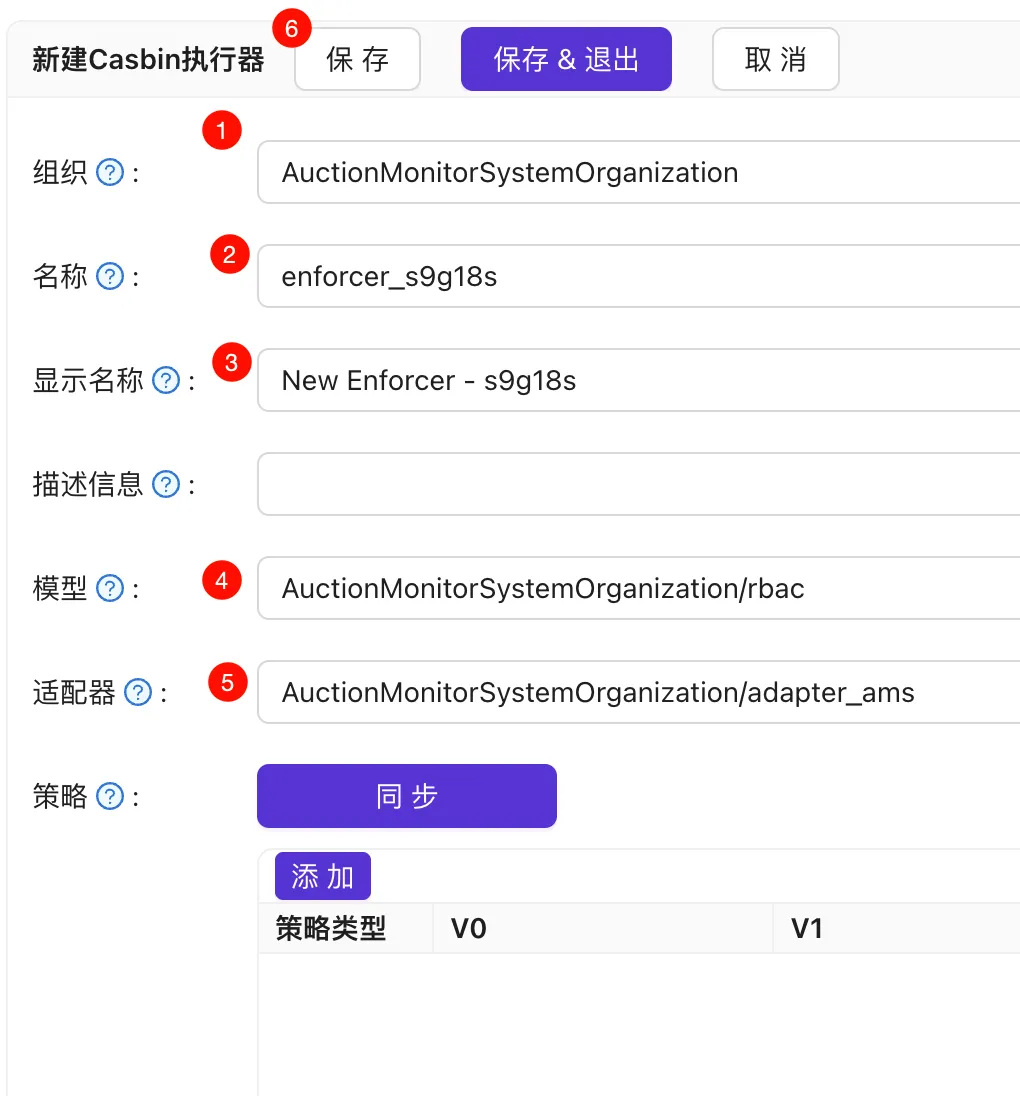
Select the model and adapter, click Save, then click Sync.
Add policies to the Casbin Enforcer. Policy types are
p(enforce policy) andg(role definition).g x ymeansxinherits all permissions ofy. See https://www.casbin.org/docs/rbac.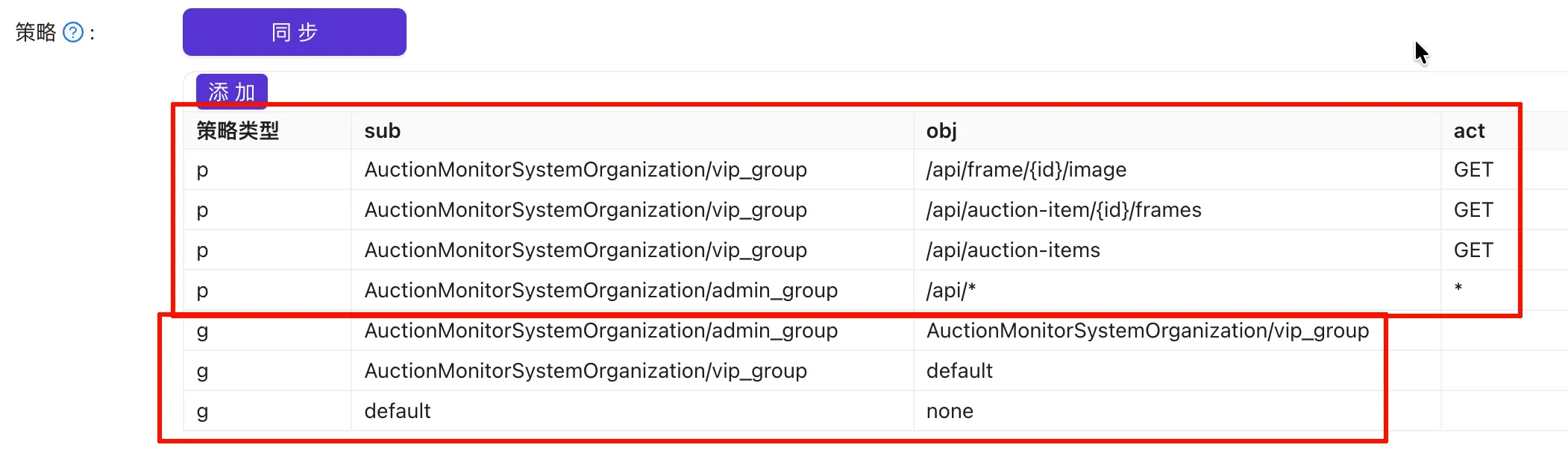
Update the backend JWT claims definition (to get groups from the JWT).
1
2
3
4
type customClaims struct { Groups []string `json:"groups"` jwt.RegisteredClaims }Update Middleware to use groups as the subject. Since we use custom policies, public APIs like
/api/authcan now be authorized via Casdoor. (I set roles with no claims tononeand roles with claims but no groups todefault).1 2 3 4 5 6 7 8 9 10 11 12 13 14 15 16 17 18 19 20 21 22 23 24 25 26 27 28func Middleware() fiber.Handler { return func(c fiber.Ctx) error { claims, err := parseJwt(c.Cookies(AccessTokenCookie)) if err != nil { return fiber.NewErrorf(fiber.StatusUnauthorized, "JWT parsing failed: %s", err) } var sub string switch { case claims == nil: sub = "none" case len(claims.Groups) == 0: sub = "default" default: sub = claims.Groups[0] } res, err := Enforce(c.Context(), sub, c.Path(), c.Method()) if err != nil { return fiber.NewErrorf(fiber.StatusUnauthorized, "Enforce failed: %s", err.Error()) } if !res { return fiber.ErrUnauthorized } return c.Next() } }Update environment variables and Enforce API code:
ENFORCER_ID="AuctionMonitorSystemOrganization/enforcer_ams"1 2 3 4 5 6 7 8 9 10 11 12 13 14 15 16var enforcerId = util.GetEnv("ENFORCER_ID") func Enforce(ctx context.Context, sub, obj, act string) (bool, error) { logger := util.LoggerFromCtx(ctx, util.RequestIdKey) resp, err := util.HttpClient.Post(enforceUrl, client.Config{ Ctx: ctx, Param: map[string]string{ "enforcerId": enforcerId, // Changed here }, Header: map[string]string{ fiber.HeaderAuthorization: util.BasicAuth(clientId, clientSecret), }, Body: []string{sub, obj, act}, }) // Remaining code omitted
Displaying User Info in the Frontend
Since Casdoor handles user management, we need a way to display info on the frontend.
We can use the standard OIDC API (/api/userinfo) to get real-time info (getting info from JWT isn’t ideal as it doesn’t update when user data changes). Access it using a Bearer Token. Result:
| |
If not using HttpOnly Cookies, the frontend can call Casdoor directly. Otherwise, the request must go through the backend.
When redirecting to login, set the scope to openid profile to retrieve user information.
| |